Chhath Puja Photo Editing Ai Prompt – Reels TemplateHello friends, In today’s article, we’re giving you Chhath Puja Photo Editing Ai Prompt, absolutely free. Using these prompts, you can turn your own photo into a realistic Chhath Puja AI image in just one click. Here, you’ll find some of the best Chhath Puja AI prompts that you can simply copy and paste to generate your photo. Below, we’ve shared the complete step-by-step process to help you create your image easily. So read the article till the end to understand everything and learn why these photos are going viral all over the internet. Why Chhath Puja AI Photo Editing Is Going ViralThe main reason Chhath Puja AI Photos are trending is that the festival is just around the corner. People have already started editing their photos and uploading them on social media platforms. These AI photos look beautiful and realistic, and the best part is that you don’t need to go anywhere for a photoshoot. You can make them right from your phone or laptop — in just one click. Once people upload these images online, others start commenting, asking for the same AI prompt, which makes the trend spread even faster. That’s why this type of photo is going viral everywhere. What Is Google Gemini AI?Google Gemini AI is an advanced image-generation tool that brings a new feature called “Nano Banana”, designed to make AI photos look more natural and realistic. Its biggest upgrade is character consistency — even if you change your pose, outfit, or background, your face stays the same without any distortion. Gemini AI also includes a multi-image blending feature that lets you combine multiple photos into a single, seamless picture. For example, you can merge your photo with a Chhath Ghat or river scene to make it look like a real festival photoshoot. Every image generated with Gemini AI also comes with a visible watermark and invisible SynthID tag, ensuring transparency that the photo is AI-generated. Chhath Puja Photo Editing Ai Prompt – Reels Template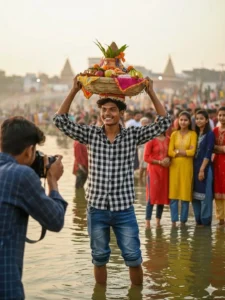 PROMPT- An 18 years old young man wearing black checked shirt and blue baggy jeans and standing in the middle of Chhat Ghat and carrying the Chhath on his head at the bank of river and He is smiling warmly and looking off-camera with and photographed by a 18 years old young man with dslr while posing and behind him is the Chhat Puja crowd and some around 16-17 years old young girls are wearing top/kurti, jeans and watching him and smiling. Face 100% match as reference image 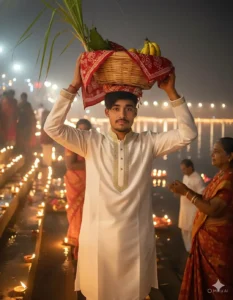 PROMPT- Create a highly realistic, 8K HD quality image, as if taken with a large professional camera in night view. The scene is set at a Chhath ghat, with lamps glowing in the background, creating a warm, festive atmosphere. A young man in an expensive, elegant kurta is lowering a traditional offering basket from his head with the help of a third person. The basket is covered with a traditional cloth, showing glimpses of bananas and sugarcane leaves. The boy is facing forward, and his face perfectly Chhath Puja Photo Editing Ai Prompt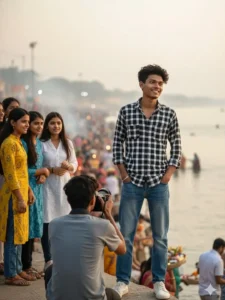 PROMPT- An 18 years old young man wearing black checked shirt and blue baggy jeans and standing in the middle of Chhat Ghat at the bank of river and He is smiling warmly and looking off-camera with his hands in his pockets and photographed by a 18 years old young man with dslr while posing and behind him is the Chhat Puja crowd and some around 16-17 years old young girls are wearing top/kurti, jeans and watching him and smiling. Face 100% match as reference image. Chhath Puja Photo Editing Girl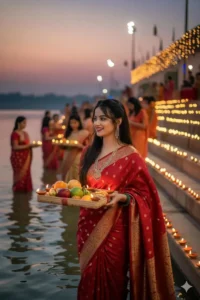 PROMPT- Create an image of chath puja celebration a festival of bihar. This picture is of evening and use the image provided of the girl where shes holding the rectangle bihari traditional soup full of fruits thekua, diya and standing, seating, in the water at the ghat, her hair is open and she’s full of gratitude and devotion. The ghats are all decorated with lights and soups for chath puja and for celebration. She’s wearing cherry red banarasi silk saree with jewelry. 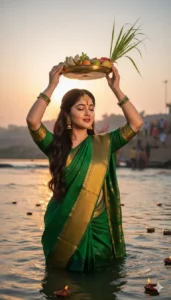 PROMPT- Create an image of the reference image of a woman in green silk saree with gold border, With gold earings and mangtika, a traditional nose ring celebrating Chhath Puja at the ghats, standing in middle of river ,the slightly side pose holding a soop of fruits , sugarcane above her head with both hands and eyes are closed. The glowing diyas are floating in the river, How to Create a Chhath Puja AI Photo (Step-by-Step Guide)You can easily create a Chhath Puja AI photo using Gemini AI. Just follow these steps carefully:
Tips for Realistic and Eye-Catching Chhath Puja AI PhotosTo make your AI photo look natural and professional, keep these points in mind:
ConclusionWe hope you’ve learned how to create Chhath Puja AI Photos using Google Gemini and why they’re trending so fast. | Responsive Ads Here! |
For advertising in this website contact us YOUR E-MAIL ID